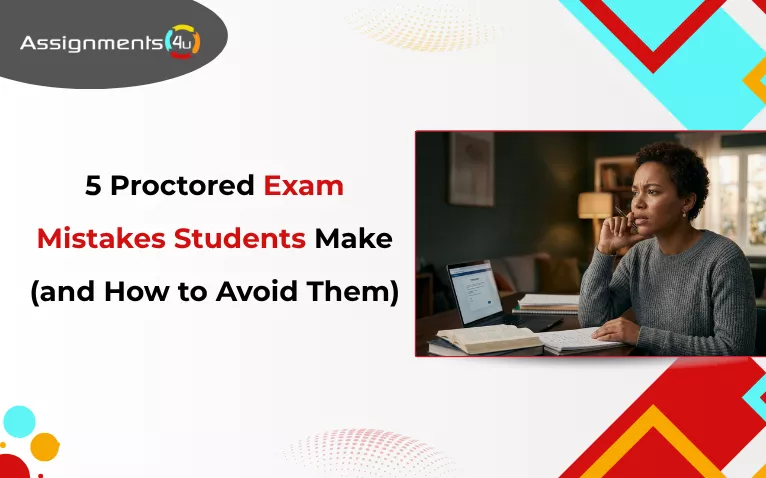
Picture this: You’ve spent three weeks caffeinating your way through 400 pages of notes. You sit down, heart racing, and launch your exam. Ten minutes in, a red box flashes on your screen: “Violation Detected.” Your stomach drops. You weren’t cheating, but your Wi-Fi flickered, or your webcam caught a glimpse of a textbook on your shelf.
The reality of modern testing is that knowing the material is only half the battle. If you don’t master the “rules of the machine,” you can fail before you even answer Question 1. But fret not! We are here to help you understand the top 5 proctored exam mistakes students make and how to avoid them properly.
Key Takeaways
If you’re in a rush, here is the “TL;DR” of how to stay in the clear:
- The Tech Fail: Relying on Wi-Fi instead of an Ethernet cable (Essential for ProctorU).
- The Room Trap: Leaving clutter or open doors in your background (A red flag for Proctorio).
- The Sync Error: Skipping the “System Check” 48 hours before the start.
- The “Silo” Study: Memorizing facts instead of linking ideas with mind maps.
- The Protocol Breach: Stepping away for a break without clicking “On Break” or notifying the proctor.
Want to know exactly how to bulletproof your setup so you can focus on your grades instead of your hardware? Let’s dive into the details
What Is an Online Proctored Exam?
Just as in traditional exams where your teacher constantly keeps an eye on you, in online exams, AI keeps you in check! In order to maintain academic integrity and honesty during online exams, institutions use proctoring systems like ProctorU, Proctorio, and Respondus Monitor.
Online exam proctoring is essential for exam integrity; however, students often face challenges while taking online assessments. Knowingly or unknowingly, students make mistakes that cost them grades and even their reputation.
Therefore, let’s learn about AI proctoring for online testing and how to avoid the mistakes.
Top 5 Proctored Exam Mistakes Students Make (and How to Avoid Them)
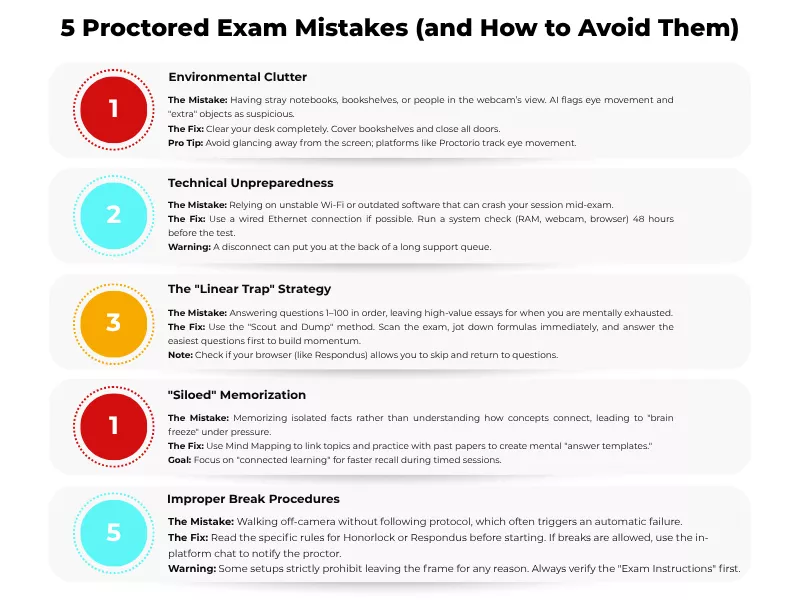
1. The “Ghost” in the Room: Environmental Clutter
Proctoring AI is designed to be suspicious. If your webcam catches a bookshelf, a stray notebook, or even a roommate walking past an open door, it triggers a flag.
How to Avoid It: One of the most significant mistakes to avoid in a proctored testing environment is having a cluttered desk. Your desk should be clean. Furthermore, while taking the test, you must keep the bookshelf covered and other devices in a different room altogether.
For instance, Proctorio uses automated eye-tracking. If you keep glancing at a “cheat sheet” to cheat on Proctorio taped to your monitor or looking toward an open door, the AI will flag your “Suspicion Level” for instructor review.
2. The “Wi-Fi Gamble”: Technical Unpreparedness
Standard home Wi-Fi is prone to “jitter” or brief drops. While a 1-second drop is fine for Netflix, it can terminate a proctored session instantly.
How to Avoid It: As part of proctored exam preparation, check your Wi-Fi connection. If needed, switch to a wired Ethernet connection. Also, 48-hours prior to your exams, ensure your browser, RAM, and webcam are all compatible with the latest software updates.
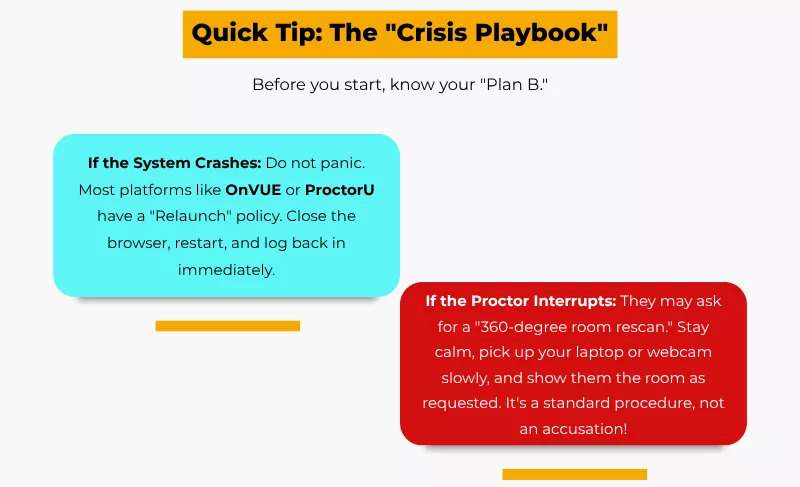
For example, ProctorU often requires a live proctor to “handshake” with your system. If your connection drops, you may be stuck in a long queue waiting for a proctor to let you back into the exam. Accessing cell phones, using notes, having “friends” in the room, or diverting eyes from the screen are critical mistakes that proctoring systems are designed to flag as unauthorized behaviors.
Therefore, if you plan to disconnect midexam to cheat on a proctored exam, you will be held accountable for academic dishonesty.
3. The “Linear Trap”: Poor Test-Taking Strategy
Many students start at Question 1 and grind through. By the time they reach the high-point “essay” questions, they are mentally exhausted.
How to Avoid It: One of the online proctored exam tips is that you must follow the “scout and dump” strategy. Instead of starting at question one, it is more efficient to scan the paper and bullet-point key formulas and points while your brain is at its freshest. Also, you must start with the questions you know; this helps you to build “grade momentum.”
However, if your instructor uses Respondus LockDown Browser, you must know that you will not be able to leave the exam environment. Evidently, cheating on the Respondus LockDown browser isn’t as easy as people say.
4. The “Silo” Study Method: Learning Without Linking
Memorizing isolated “blocks of notes” makes it harder to recall information under the pressure of a ticking timer and a watchful webcam.
How to Avoid It: Students often fail to use past papers to identify recurring question types and create “templates” or model answers for them. You can also use the Mind Mapping technique. Instead of a list, draw a web showing how Topic A influences Topic B. This “connected learning” makes retrieval much faster during the exam.
Pro Tip: During exams, you can avail the Take My Online Class service. While experts will manage your discussion board participation and weekly quizzes, you can focus on practicing under timed conditions. The mock exam session will help you finish the exam comfortably.
5. The “Silent Exit”: Improper Break Procedures
Leaving your seat without following the software’s specific protocol is one of the fastest ways to get an automatic failure.
How to Avoid It: Online education offers you in-platform chat. So, whenever you take a bathroom break, inform your instructor. Make sure the “On Break” screen is on. This is one of the essential ways for avoiding proctored exam flags.
Also, if you are new with these proctoring software, learn how Honorlock works or the particular software well ahead of time.
Please note: some Respondus Monitor setups prohibit breaks entirely. Always check your “Exam Instructions” page before clicking ‘Start’ to see if leaving the frame is allowed.
Now that you know the common exam mistakes students make, let’s learn how to pass proctored exams!
How to Prepare for an Online Exam with Online Proctoring?
The “72-Hour” Tech Audit
- Run Official System Tests: Use the specific check pages for proctoring services like Pearson VUE OnVUE, ProctorU, or Examity to ensure your hardware is compatible with their remote invigilation tools.
- Install Required Software: Download necessary online proctoring solutions such as LockDown Browser or Guardian Browser. You must have “Administrator Rights” to allow video proctoring and screen recording.
- Update Your OS: Ensure Windows or macOS is updated to prevent a sudden restart that could compromise your remote exam.
- Verify Hardware Specs: To support automated proctoring and AI algorithms, ensure you have at least 4GB of RAM and stable internet connections (minimum 2 Mbps upload).
- Check Data Privacy: Review the data protection and GDPR compliance of the software to understand how facial recognition software and online surveillance data are handled under local privacy laws.
The “24-Hour” Environment Scan
- Clear the “Arm’s Reach” Zone: Remove books and notes to prevent cheating flags in closed-book exams. Digital proctoring is designed to detect and prevent unauthorized materials in your space.
- Audit Your Walls: Remove or cover posters and diagrams; AI proctors may flag these as attempts to cheat in online assessments.
- Optimize Lighting: Position the light in front of you. If you are backlit, facial recognition may fail, leading online proctors to penalize you or delay your start.
- Establish a “Door Policy”: Remote invigilation requires a private space. Avoid academic misconduct flags caused by family members entering the room during online learning sessions.
The “1-Hour” Pre-Flight Routine
- Hardwire Your Connection: Switch from Wi-Fi to Ethernet to avoid drops that disrupt live proctoring. High traffic on Zoom or streaming apps in your house can ruin your student’s performance.
- Reboot Your System: A fresh restart closes background apps that trigger academic misconduct alerts or slow down AI algorithms.
- Prepare Your ID: Have a valid ID ready for the test-taker verification process. Ensure the name matches your online course registration exactly to avoid long wait times.
- Dress for Success: Avoid hoodies or large jewelry that could hide earbuds. Proctors need to see your ears to ensure no one is helping you unfairly.
- Review Assessment Types: Whether it is a standard quiz or an alternative assessment, confirm the specific rules of your distance education program before you click “start.”
Conclusion
Online courses have brought convenience and flexibility. The rise of online education has transformed how we approach assessment security, but it shouldn’t come at the cost of your sanity. While remote proctoring systems are designed to ensure that no students cheat, they can sometimes feel more intimidating than in-person invigilation. However, by using these practical strategies from stabilizing your connection to auditing your environment, you can significantly reduce the risk of false accusations of cheating.
Ultimately, whether you are taking exams in a physical hall or via a webcam, the goal of both online and in-person testing is to provide a fair and equitable environment for everyone. By staying prepared and understanding the “rules of the machine,” you can protect your student experience and focus on what really matters: showing off what you’ve learned.
Frequently Asked Questions
What Are the Most Common Mistakes on Proctored Exams?
The most frequent blunders include relying on unstable Wi-Fi instead of a wired connection, leaving “environmental clutter” (like books or phones) within the webcam’s view, not having proper authentication, and forgetting to perform a mandatory hardware system check at least 48 hours before the remote exam.
How Do I Avoid Getting Flagged on a Proctored Exam?
To ensure a fair and equitable student performance and experience, clear your workspace of all unauthorized aids, sit in a well-lit room so facial recognition software can see you clearly, and close all background applications like Zoom or Spotify before taking exams to avoid common pitfalls.
What Should You Not Do During a Proctored Exam?
Do not leave the webcam’s frame without using the “On Break” protocol, avoid reading questions out loud (which AI algorithms may flag as communicating with others), and never use secondary devices like phones or tablets, as online proctoring solutions can often detect these on your network.
What Happens If You Violate Proctored Exam Rules?
A violation can lead to your session being flagged for review by online proctors, an immediate termination of the test, or formal accusations of cheating. Depending on the severity, the institution may penalize you with a failing grade or a report of academic misconduct.
Can You Fail a Proctored Exam for Looking Away?
While a single glance away rarely causes an automatic failure, frequent or prolonged looking away will trigger automated proctoring flags. AI proctors track eye movements to detect and prevent the use of hidden notes; consistently looking off-screen suggests you are attempting to cheat in online assessments.

Want To See My Profile — Check Now
- 5 Proctored Exam Mistakes Students Make (and How to Avoid Them) - April 2, 2026
- Canvas Quiz Answers Hack: Tips And Strategies To Get Canvas Answers - February 10, 2026
- How to Cheat on Respondus Lockdown Browser in 2026? - February 6, 2026