
Key Takeaways
- Respondus LockDown Browser secures exams by disabling multitasking, keyboard shortcuts (e.g., Alt+Tab), printing, screen capture, and access to other apps or websites.
- The Browser locks the computer; the Monitor uses webcam/AI to record students. The Browser does not record the screen, but Respondus Monitor records video, audio, and screen activity and uses AI to flag suspicious behavior.
- Even if cheating works with the Browser alone usually fails when the Monitor is active.
- Common cheating attempts include secondary devices (phones/tablets), hidden physical cheat sheets, and technical setups like virtual machines or HDMI splitters. These are very risky and not recommended.
- The best way to bypass the lockdown browser is not by cheating but by seeking professional assistance.
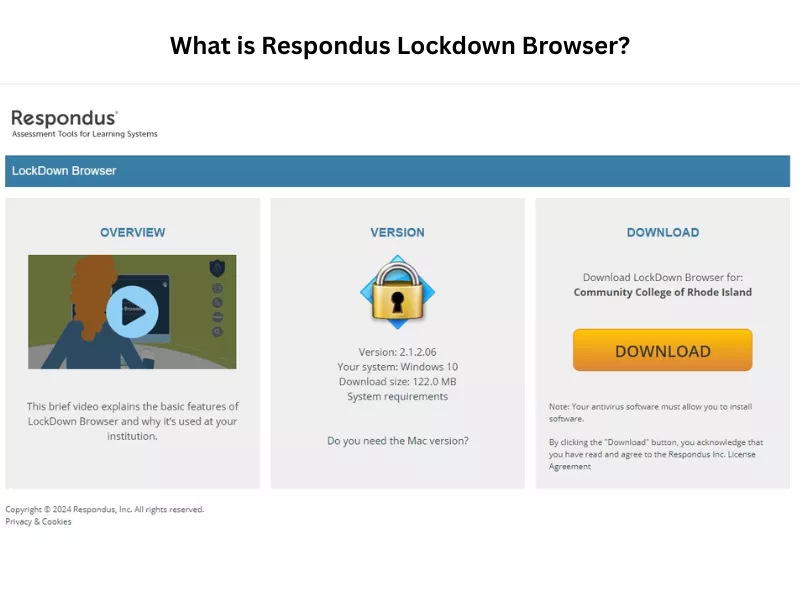
What Is Respondus Lockdown Browser?
How The Lockdown Browser Works? Features Explained
As the name suggests, Lockdown browser locks the exam window and limits navigational access until the test ends. It generally has features like full-screen display mode, background application blocking, exit restriction, and an exclusive entry pass. Let’s understand the features of a Lockdown Browser and how they function during proctored tests to avoid basic proctored exam mistakes:
| Features | How Do They Work To Prevent Cheating |
|---|---|
| Full-Screen Display Mode |
|
| Limited Browser Controls |
|
| Application Blocking |
|
| Printing & Screenshot Disabled |
|
| Copy-Paste Disabled |
|
| Keyboard & Mouse Limitations |
|
| Exit Restriction |
|
| Exclusive Browser Requirement |
|
Can I Cheat on Lockdown Browser and Get a Top Score on the Test?
Yes! You can cheat on respondus lockdown browser, but getting the top score is not guaranteed.
There are multiple ways in which students attempt to cheat. However, all of these cheating methods are not foolproof and come with limitations.
For example, exam questions can vary, so pre-written cheats may sometimes be useless. Also, using a second device to cheat on the lockdown browser is time-consuming. Also, answers found on the internet are not always reliable.
Plus, even when sharing resources with friends on chat apps, uncertainty remains. They may be busy, give incorrect answers, or only take without contributing. So be careful who you collaborate with when cheating as a team.
Therefore, relying solely on cheating to achieve top grades is not really a good idea. It is always recommended that students study hard and prepare for the exam.
Yet, if you still want to know hacks to bypass the system, we have discussed some in the next section!
How to Cheat on Respondus LockDown Browser: 5 Methods
Old-School Strategies:
First, prepare a cheat sheet and write down the important notes and formulas for quick access. Second, highlight the important parts in your notebooks or books. Use bookmarks and place them accordingly between the pages. One of the Environmental scan hacks is sticking notes behind the laptop screen. This saves time and effort while taking a quick look. Lastly, you can also write down points on your palms for a quick recall. You can also use these methods for Moodle exams, but first, know whether Can Moodle Detect Cheating.
Secondary Device Strategy:
You can easily cheat on your Respondus test using a smartphone or tablet, or another Mac or laptop. If you are using a phone, get on a call with a buddy or an expert to get help. You can also use messengers or emails to get help. However, it takes a lot of time. Use a tablet or a second laptop to browse external web resources to look for answers. There are many online sites where you can discover study materials and answer keys from previous midterm and final question sets. We have also discussed this method in Canvas Quiz Answers Hack!
Using a Virtual Machine and HDMI Splitters:
Using a VM lets you run other operating systems at the same time with high-speed internet or wi-fi. Before you start, you need to install and modify the registry properly. Once that’s set up, it’ll behave like a real computer. You can then take your test without worrying about the system catching you. A hardware-level bypass is using an HDMI splitter; some students mirror their screen to a second monitor in another room. Then a friend can see the questions and type back the answers. You can also use this if you are searching for how to cheat on ExamSoft. But, unless you are tech-savvy, be warned. This is not a recommended method to cheat. Above all, it’s risky!
Desktops.exe:
This file allows you to access the desktop of another computer remotely. It lets you run apps and view the desktop of another machine while you’re using the Respondus Lockdown Browser. The idea is that you can secretly access your files, minimize the exam window, open applications, and use most of the features that the lockdown browser prohibits. But it’s a risky approach towards cheating on lockdown and not recommended either. This method is often recommended to students wondering how to cheat on MyMathLab.
A Second MAC User:
Mac users can navigate Respondus LockDown Browser. Creating a secondary user account with a secure password. By using Keyboard Maestro Editor to record a macro via the View tab, you enable rapid switching. Once named and activated, this shortcut allows seamless transitions between profiles during an exam. Using these types of hacks is not everyone’s cup of tea. Therefore, it’s better to be cautious instead of getting overconfident in your tech skills! If you do not know how to cheat on McGraw-Hill Connect, don’t try to use this method either.
Does LockDown Browser Record Your Screen?
No! Lockdown Browser does not record your screen. However, the Monitoring Tool and Lockdown Browser can be used simultaneously for full-fledged proctoring. In this case, test takers are virtually monitored and recorded throughout the test session.
Only Respondus Monitor has the screen recording feature that can see the on-screen activity of the student, and it can even detect how long you have left the screen has been left unattended. This monitoring software easily integrates with LMSs like Canvas, MyMathLab, and McGraw-Hill. If you go wrong or get caught, your institution will punish you.
Therefore, the abovementioned ways to cheat on lockdown do not work with proctored examinations monitored through Respondus Monitor. Don’t panic, your professor will let you know if they are using any Monitoring software.
We also have an article on Can Canvas Detect Cheating for proctored or non-proctored exams. Do give it a read as well.
Restrictions with the Monitoring Tool: Respondus Monitor vs. Lockdown Browser
Before trying to cheat using any of these methods, make sure the exam is only held on Lockdown Browser and is not being proctored through Respondus Monitor. Respondus Monitor is a fully automated proctoring software that enables webcam and microphone access, while the Lockdown Browser is a part of it (often used separately for cost and privacy reasons).
Here’s a comparison of Respondus Monitor vs. Lockdown Browser:
| FEATURES | RESPONDUS LOCKDOWN BROWSER | RESPONDUS MONITOR |
| Controls access to other websites/applications | YES | NO |
| Prevents printing | YES | NO |
| Prevents copying/pasting | YES | NO |
| Prevents screenshots | YES | NO |
| Records student webcam | NO | YES |
| Deters looking away from the screen | NO | YES |
| Checks for unauthorized surroundings | NO | YES |
| Automated proctoring triggers. | NO | YES |
| External monitor detection | NO | YES |
| Face detection flags | NO | YES |
How Respondus Lockdown Browser Works on Canvas
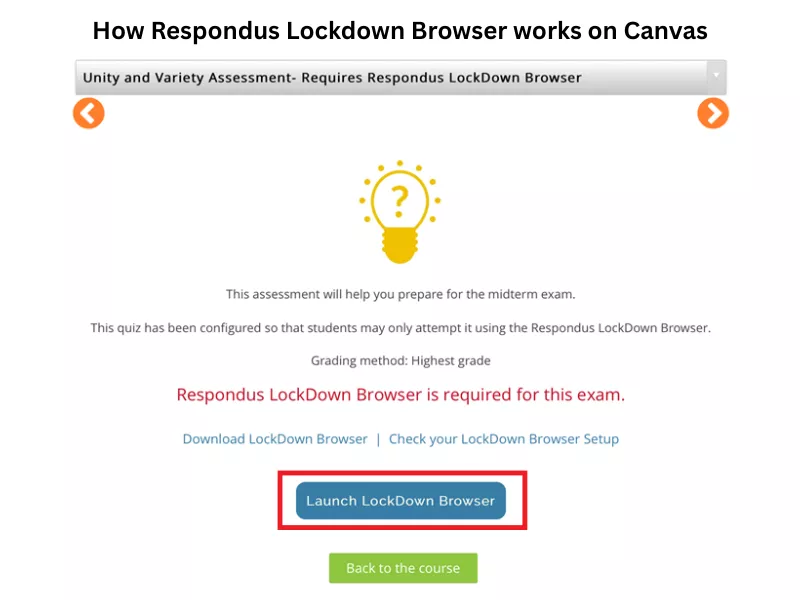
To secure Canvas exams, instructors use Respondus Lockdown Browsers. Here’s how the integration works:
- Opening the desired course on Canvas through the instructor’s settings.
- Clicking Settings at the bottom of the left-hand course menu. Opening the Navigation tab at the top of the page.
- Scrolling to the bottom of the list of hidden items and locating LockDown Browser. Then, clicking the three-dot icon (or gear) and selecting Enable.
- Clicking the Save button at the bottom of the screen and integrating the tool into the active course navigation.
Now, if you are wondering how to cheat on a proctored exam with Respondus, in the next section, we have discussed top tricks.
Respondus Limitations in Blackboard
Respondus LockDown Browser and Monitor in Blackboard securely lock the testing environment. However, several key limitations affect Respondus usage within Blackboard. These are:
- First of all, the browser does not support all Ultra questions.
- Poor configuration can block approved external academic resources.
- Students must install it on Windows, Mac, or iOS. It does not support mobile phones or older Chromebooks.
- Institutions using Monitor must manage the limited available seats.
Get Respondus Exam Help Service from Experts and Improve Your Score
In case you feel trying popular college hack methods is not worth a try, then you can look for distance learning help from subject matter experts!
At Assignment4U, we have the best network of experts, and you can pay someone to take your proctored exams on Respondus Lockdown Browser. We ensure 100% safe methods for students to hire subject matter experts to achieve impressive academic results. If you are looking for a reliable assignment for help, we offer a money-back guarantee if we fail to keep our promise. Just share your exam details, and the rest is on us!
We have helped over 50,000+ students pass their finals week quiz assessments and online exams. And guess what? 95% of them have achieved As in their results! So, contact us now to get the best academic help in the USA.
Related Blogs

How To Cheat On IXL – Get A Complete Guide With Effective Tips

How To Cheat On WileyPLUS? 10+ Cheat Ideas & Hacks!

How Do You Cheat On ALEKS Test?

Want To See My Profile — Check Now
- 5 Proctored Exam Mistakes Students Make (and How to Avoid Them) - April 2, 2026
- Canvas Quiz Answers Hack: Tips And Strategies To Get Canvas Answers - February 10, 2026
- How to Cheat on Respondus Lockdown Browser in 2026? - February 6, 2026