Socrative, the online tool that helps educators create tests and interact with students, does not have any built-in proctoring, but can prevent cheating with features like shuffled questions/answers and IP checks. The tool also provides features to teachers to spot issues, like reviewing answer patterns to monitor suspicious activities.
Since numerous institutions use Socrative, students often look for ways to get around the system to get correct answers and score well. While most of you wonder, can Socrative detect cheating, we have put together a few points that will not only answer the question but will also help you learn more about the tool.
Let’s get started!
Key Takeaways
- Socrative has no built-in proctoring but uses quiz settings and activity reports to discourage and flag cheating.
- Teachers can reduce cheating with timed quizzes, one-question display, and randomized questions/answers.
- Response patterns, timestamps, and score similarities help instructors spot suspicious behavior.
- Socrative does not track webcams, screens, tab switching, or browser activity.
- Cheating is possible, but teachers can often identify irregular behavior through reports.
- Exit Tickets and live results help teachers assess understanding and detect inconsistencies.
- Effectiveness depends largely on how instructors configure and monitor quizzes.
What Is Socrative?
Socrative is a web-based platform for educators that helps create interactive and engaging formative assessments. This helps them get real-time feedback on student understanding, reduce grading time, and adjust instructions accordingly. Students can use the platform for both remote and on-campus sessions.
The platform offers gamification features like Space Races. In this case, students are asked to complete a test within a time limit. The questions are multiple-choice with three options. Students get all the instructions on their screens to follow and answer the questions accordingly.
Moving on, let’s take you through the features of this platform before answering the main question. We will also give you an insight into whether there are any Socrative hack, like Canvas quiz answers hacks, for the platform.
What Are the Key Features of Socrative?
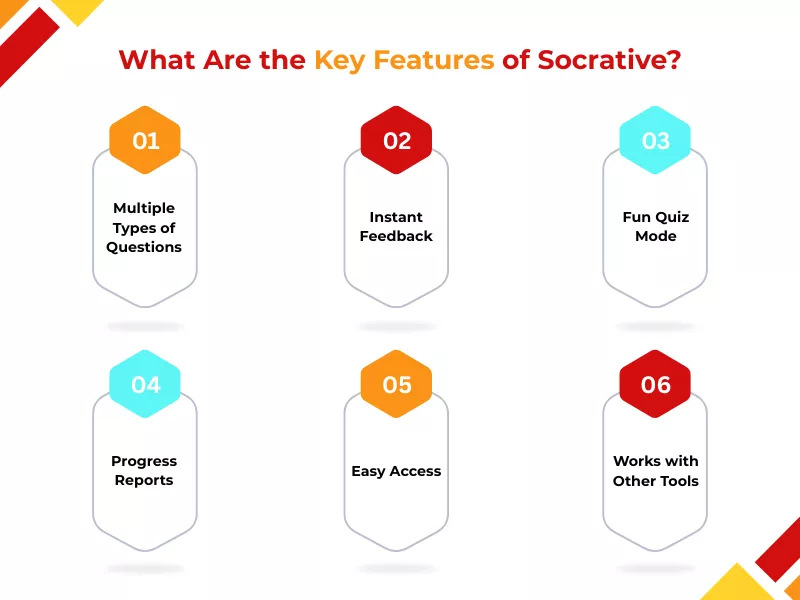
There are various features on Socrative that can help improve teaching and learning for both students and teachers. Here’s a look at the different features:
A. Multiple Types of Questions
The platform offers teachers the option of setting up various types of questions. The questions range from multiple-choice questions, true or false, to short-answer type questions. This helps teachers track student performance and take immediate action when necessary.
B. Instant Feedback
Teachers can view live answers and monitor student activity to help spot the gap between teaching and learning and help students immediately. Students can also avail ‘pay someone to take my online class’ services for assistance with the process and lessons.
C. Fun Quiz Mode
The Space Run game offered by the platform is one of the best features. While you can cheat in games to get to your goals, you will not be able to cheat on Socrative. These kinds of quizzes make learning more interactive for students, as they can compete in teams.
D. Progress Reports
Socrative is an online tool that allows teachers to get detailed reports of student performance over time, and these can be downloaded in several formats.
E. Easy Access
The platform is compatible with iOS, Android, and the web. Also, this platform works on other devices like tablets, computers, laptops, and smartphone (as a mobile app), thus letting students use it from anywhere.
F. Works with Other Tools
The platform is acquired by Showbie, which lets teachers share quizzes and reports easily.
Can Socrative Detect Cheating?
You have been waiting for this answer for long. We know that. So, without wasting any time, let’s address the elephant in the room: can Socrative detect cheating? The one-word answer to the question is yes. Socrative can detect cheating using other tools.
Throughout the discussion, we have talked about the fact that Socrative does not have any built-in tools to detect cheating, but uses third party software. So, how does Socrative detect cheating? Let’s answer that in the following section.
How Does Socrative Detect Cheating?
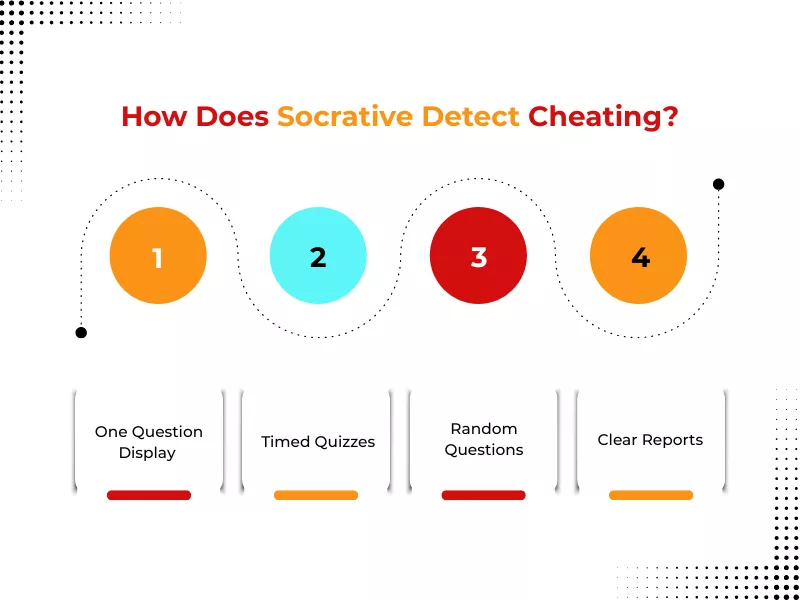
We have already talked about the fact that Socrative does not have anti-cheating features. So, to ensure students don’t cheat in the tests, the platform uses features that make cheating difficult for students. The features include:
A. One Question Display
Socrative quizzes are displayed one by one, thus making things difficult for students to get the answers beforehand.
B. Timed Quizzes
Instructors have the option of setting timed quizzes for students. This prevents students from looking for answers online or asking their friends. Since the quizzes are timed, students need to answer all of them within that time.
C. Random Questions
The platform offers teachers the option of randomizing questions. It makes it difficult for students to share answers with one another. You might not be attempting the same question as your friend. Therefore, there’s no chance of cheating on the platform.
D. Clear Reports
Socrative tracks students, analyzes, and reports their responses, thus allowing teachers to detect suspicious activities, unusual patterns, or information that might work as proof of cheating.
The platform uses these methods to detect cheating. Now, you might wonder if these features are effective in cheating detection or not. Don’t worry, we have an answer for that too! Read on to learn all about it.
Are Anti-Cheating Features in Socrative Effective?
All of these can help prevent cheating in Socrative. Despite these features, students still find ways to cheat on the platform. Moving forward, we will take you through the ways you can cheat to get the platform’s Socrative test answers.
How to Cheat on Socrative?

Here are a few ways students can use to cheat on Socrative:
A. Text Your Classmates
Students can message or email their classmates for cheating in online tests or online quiz. This can help them get good grades, but there are also risks of being caught.
B. Use a Duplicate Account
You can create a duplicate account on Socrative and use it to look at questions or attempt an answer before submitting it on the primary account. However, you must be aware that teachers can track such activities and might penalize you for using unfair means to pass the tests.
C. Use Another Device
You can use external devices such as smartphones or tablets to look for Socrative test answers. Since Socrative does not use any proctoring software, you can look for answers on another device without alerting your teacher. However, you must remember that Socrative only permits one device per student, and using a second one might get you into trouble. It prevents students from logging in several times.
D. Screen Sharing
Students can share their screens with their friends to get help with the quizzes. While there’s no way for the platform to detect it, teachers can understand if you are answering too quickly or too slowly. Teachers can watch one screen to keep track of their behavioral patterns and understand if they are using any unfair means.
E. Recruit a Friend
Recruiting a friend while using Socrative is a typical way for students to work on challenging and tricky questions. However, you must be aware that you will not be able to learn anything and face punishment if you are caught. It is wise to use this Socrative cheat with caution to avoid being detected.
Can Teachers Tell if You Cheat on Socrative?
Yes, teachers can tell if you cheat on Socrative. Here are a few ways your teachers can understand if you have cheated or not:
A. Uploading and Comparing Work
Teachers can upload student assignments to compare them with a vast database and public sources to identify similar content. They also look at previous submissions to understand if you have cheated or not.
B. Quiz Setting to Prevent Socrative Cheating
Teachers have control over quiz attempts and get alerts for any suspicious activities. Additionally, multiple-choice questions and answer choices are shuffled for every student, making copying difficult.
C. Pattern Check and Photo ID
Socrative provides teachers with the option to review response times for unusual patterns, compare student answers, and require students to upload photos to check their identities. If a student uses a second account to click on questions during class and submit answers on their main account, teachers can trace it.
What Is an Exit Ticket on Socrative?

An exit ticket on Socrative is a quick, digital formative assessment tool used at the end of a lesson to gather immediate feedback on student understanding. It is one of the Socrative features that allows teachers to check objectives, clarify misconceptions, and plan next steps.
The exit ticket generally has three questions to understand how well a student understood the lesson. Here are the three ways teachers use this to understand a student’s grasp of a topic:
➜ Students answer a multiple-choice question to help teachers understand their knowledge of the topic.
➜ Students can write what they learn in an open-response format. Also, Socrative helps teachers see student answers in their own words.
➜ The teacher assigns a specific question to get focused feedback.
This is how the exit ticket works:
➜ Teacher setup – The teacher uses Socrative to create or select an Exit Ticket, which can also be a pre-made template or custom questions.
➜ Student response system – At the end of the class, students login and answer 3-4 brief questions, which generally include:
a. A rating of their understanding
b. A summary of what they learned
c. A response to a specific question or problem the teacher asked.
➜ Teacher review – The platform generates a report, which includes a snapshot of class comprehension and individual student feedback, thus helping teachers adjust homework or future lessons.
How Do Students Use Socrative?
Students can use Socrative by joining their teacher’s virtual room code on their device. They can then answer live quizzes, exit tickets, or polls to receive instant feedback or wait for overall results. Further, it allows anonymous participation, self-paced learning, and competitive ‘Space Race’ games, thus making it a dynamic tool for formative assessment.
Here’s a step-by-step guide:
➜ Visit the official Socrative website
➜ Go to the student login page
➜ Enter the room code
This will help you start using the platform and enjoy all its features.
What’s New in Socrative?
The recent updates on Socrative are heavily focused on AI-powered features like question generation and results insights, along with significant improvements to its Results Tab. Here’s a look at the key new features and updates:
➜ AI Results Insights
➜ Revamped Results Table
➜ AI-Powered Question Generator (beta)
➜ Weighted Questions and Manual Grading
➜ LaTeX and Equation Editor
➜ Data Handling for AI
➜ Team Libraries
Endnote:
Although Socrative does not have any proctoring software, it can detect cheating by identifying behavioural patterns. While it is possible to cheat on Socrative, students will need extra caution. The platform allows teachers to keep track of student activities and monitor them to prevent cheating. If you are struggling to maintain your grades under such scrutiny, seeking professional help with assignments can ensure you submit accurate work without the risk of technical flags.
Also, you will not be able to learn your subjects well if you rely on cheating methods. It is recommended that you get expert assistance to understand the quiz and test format and answer all the questions correctly.
Frequently Asked Questions
Can Socrative detect cheating during quizzes or tests?
Socrative cannot detect cheating independently during quizzes or tests. The platform is not able to monitor screens, webcams, or eternal activity. However, instructors can detect suspicious activities by reviewing response timing, answer patterns, or unusual score similarities.
Does Socrative track student activity while taking a quiz?
Socrative can track basic quiz-related activity, such as answer submissions, timestamps, and quiz completion status. The platform does not track browser activity, keystrokes, screen actions, or what students do outside the Socrative quiz environment.
Can teachers see if students switch tabs on Socrative?
No, Socrative cannot detect tab switching or if a student leaves the quiz window. This allows students to move between tabs and is something that the platform cannot keep in control.
Does Socrative record IP addresses or locations?
Socrative does not openly share the IP addresses or locations of students. The system provides student logs, but does not give access to IP or locations to the teachers.
Does Socrative record timestamps or answer changes?
Yes, Socrative records timestamps and answer changes. These are visible to instructors only through the Socrative teacher app.
Can Socrative see if multiple students use the same account?
Socrative does not notify teachers directly when multiple students use the same account. However, it can indicate the behavior due to an IP check, logging patterns, and timestamps.
Related Articles


Can Canvas Detect Cheating? The 2026 Truth About Logs, AI, and Proctoring

Want To See My Profile — Check Now
- MyOpenMath Homework Answers: Your Guide to 100% Accuracy - January 14, 2026
- Can Socrative Detect Cheating? Your Guide to Ace Exams - January 7, 2026
- Learn How to Get ALEKS Solutions Before You Buy ALEKS Answer Keys - December 19, 2025