
- How the platform works
- How the grading process works
- How to complete challenging homework
- How to improve your performance
Let’s begin.
Key Takeaways: MyMathLab Homework Tips: What Students Should Remember
- Check the assignment instructions before starting.
- Understand how attempts are scored.
- Enter answers using the required format.
- Review mistakes instead of repeatedly guessing.
- Check fractions, exponents, signs, and parentheses.
- Start before the deadline.
- Check your course’s late-submission policy.
- Use Study Plan and practice tools to prepare for tests.
How Is MyMathLab Homework Graded?
MyMathLab grades each homework question automatically, and your score updates in the course gradebook each time you complete a question.
How Does MyMathLab Grade Homework, and Do Wrong Attempts Lower Your Score?
When you enter the MyMathLab answer and click Check Answer, the system offers immediate feedback, telling you whether the answer is correct or not.For MyMathLab homework, you get multiple attempts. If you are out of regular tries, you can click Similar Question to know how to work on the problem.If you use the worked solution from a similar question as a guide, please note that the platform randomizes the values. MyMathLab homework sets are designed to help you learn the concept, with unlimited retries before the deadline. Depending on your instructor’s settings, you may be able to rework questions with new values until the due date to improve your score.
How Many Attempts Do You Get on MyMathLab?
You generally get three attempts per question on MyMathLab homework problems. However, it may vary by course and assignment type.
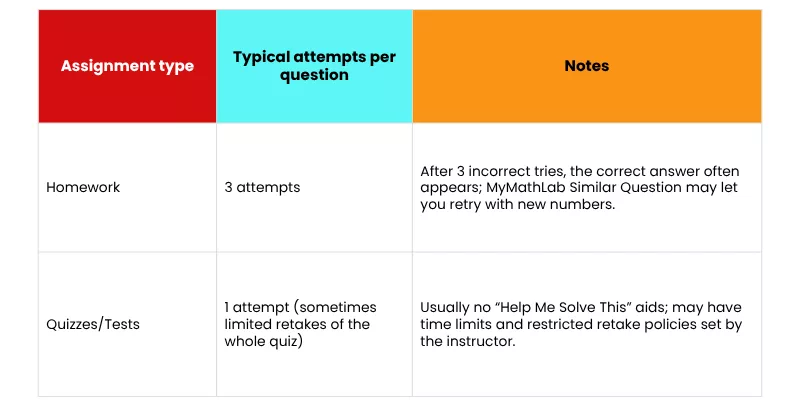
Since MyMathLab is highly configurable, the limits depend on your instructor’s settings. While some instructors allow unlimited attempts, other instructors restrict attempts (e.g., 3–5 per problem). If you are unsure about the number of attempts, you can discuss it with your instructor or TA.If you’re stuck on a concept before a quiz or test, review it in the Study Plan or get math homework help to understand it before you start.
Does Help Me Solve This Take Points Off in MyMathLab?
Not directly.MyLab Math’s Help Me Solve This feature is designed to help you learn the underlying concept and solve questions on your own. Using Help Me Solve This doesn’t directly “take points off” in MyMathLab, but it can affect your score indirectly depending on how your instructor has set up grading.You lose credit if you answer incorrectly or don’t solve the new version correctly within your allowed attempts.
Does View an Example in MyLab Math Cost Me Points?
No, MyLab Math’s View an Example feature does not cost any points. This actually helps by offering a solution to a similar problem in a separate window.
- Select View an Example from the Question Help menu.
- Click Continue to follow the sample solution step by step.
- Click Done to return to your original problem and submit your own answer.
How Does This Differ from Help Me Solve This?Help Me Solve This walks you through the actual question step by step. View an Example demonstrates a separate, similar question. Simply viewing that example does not replace your original problem or require you to solve a regenerated version.
Why Is MyMathLab Marking My Answer Wrong?
MyMathLab can reject a correct answer if it doesn’t match the required format or notation because it grades exactly what you enter. So a decimal where it expects a fraction, an unsimplified radical, incorrect rounding, or a missing comma can all be marked incorrect. That’s why you also need to learn how to answer MyMathLab questions to avoid getting correct answers marked wrong.For instance, if the question expects you to enter the exact solution, which is 3/4, and you enter 0.75, you will be marked wrong.
My Answer Is Right, but MyMathLab Keeps Marking It Wrong. What Am I Doing Wrong?
If you are confident your answer is correct, then you need to check these first:
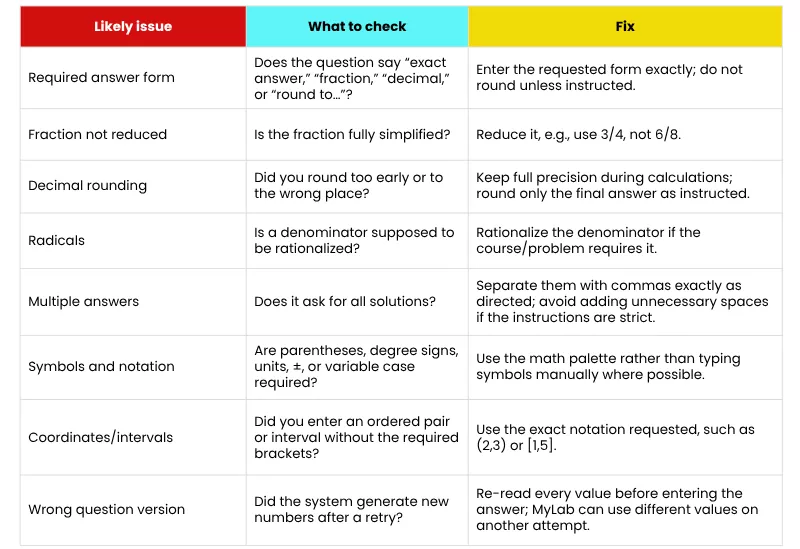
- Read the instructions again to understand how the question expects you to answer: whether it asks for an exact answer, a simplified form, rounding, all solutions, or answers separated by commas.
- Use the on-screen math palette to enter fractions, roots, exponents, pi, and inequality symbols.
- You can use the Similar Question feature to compare your answer’s formatting and notation with the expected answer.
How to Enter Fractions and Exponents in MyMathLab
To avoid common proctored exam mistakes or homework errors, always use the MyMathLab math palette for fractions, exponents, and square roots whenever they appear.
How Do I Type Square Roots, Fractions, and Exponents Correctly in MyMathLab?
One of the most common mistakes is typing the letter x as a multiplication sign; use * or the palette’s multiplication symbol. Let’s understand how to use the palette properly for accuracy.
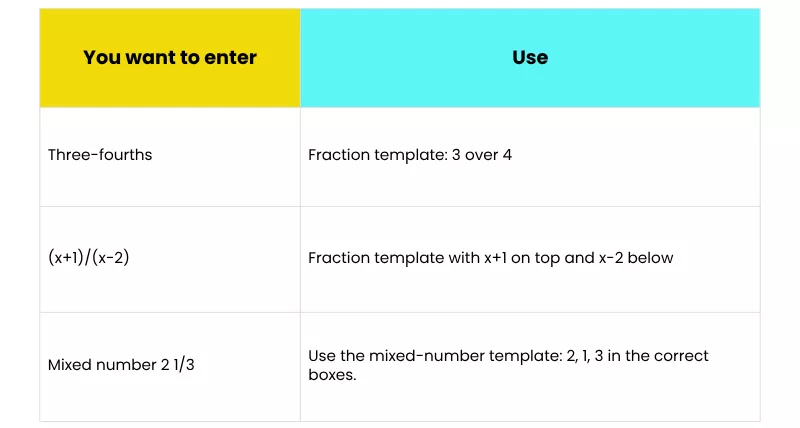
Here’s how to use the MyLab Math palette for Fractions:
- Click the fraction template in the math palette and type the numerator in the top blue box.
- To type the denominator, press Tab or the down/right arrow key to move to the denominator.
- Press the right arrow to move outside the fraction before typing anything else.
Here’s how to use the math palette for Exponents:
- Click the exponent or superscript template and enter the base.
- Move into the exponent box using Tab or the arrow keys and type the exponent.
- Press the right arrow to exit the exponent before continuing.
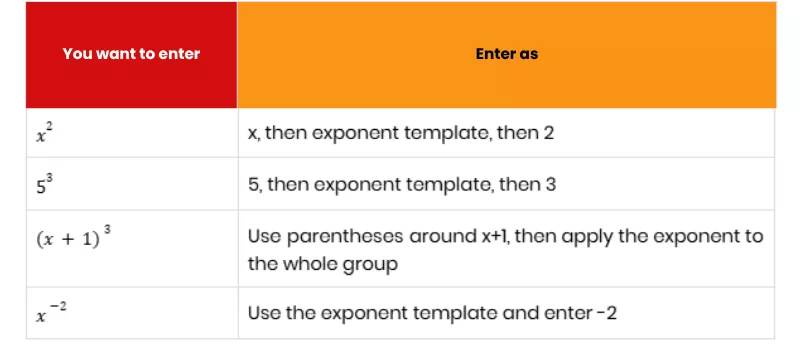
Here’s how to use the math palette for Square roots:
- Click the square-root icon.
- Type the number or expression inside the blue box under the radical.
- Press the right arrow to exit the radical before adding anything outside it.
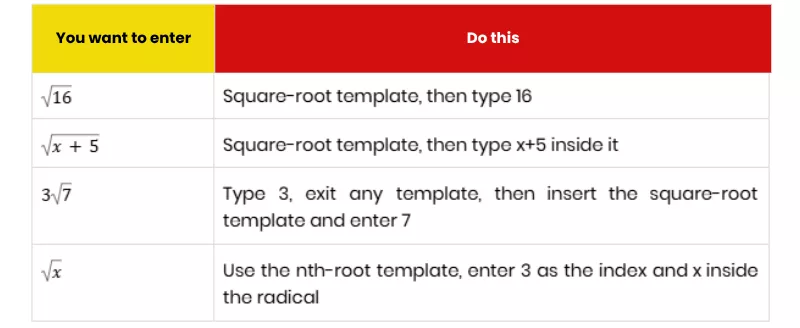
How to Submit Late Homework on MyMathLab?
If you miss a MyMathLab deadline, you usually cannot submit it late. However, if your instructor enabled a late-submission window or manually reopened/extended the assignment, then you can submit it. Whether there will be automatic grade reduction or MyMathLab partial credit enabled is up to the instructor, not MyMathLab itself.
What Happens If I Miss a MyMathLab Homework Deadline?
The assignment or task may disappear from your Assignments list or become read-only. You may still see it under Review but cannot change your score.If your instructor has set a late penalty (such as 10%, 20%, or 50%), the platform applies it automatically.To check whether you can submit late work or not, you can follow the process below:
- First, open the MyMathLab platform and go to Homework and Tests or Assignments.
- There, you will need to look for the missed assignment under Past Due, Closed, or Review.
- If it still has an Open or Resume button, click it and check the due-date/late-penalty message before starting.
When your assignment deadline is missed, you can email your professor explaining the reason. If you miss the deadline because your instructor changed the deadline suddenly, you can let them know. For that, you need to keep evidence of the previous deadline.You can avoid missing deadlines by tracking your assignment deadlines. Keep a separate tracker that also notes your current status, so if you see you might miss a deadline, you can contact your instructor early or get online assignment help with concepts you’re stuck on.
Is MyMathLab the Same as MyLab Math?
Yes, both MyMathLab and MyLab Math are the same. Pearson officially launched MyMathLab in 2001 and rebranded it as MyLab Math in 2016.
What’s the Difference Between MyMathLab and MyLab Math?
| Name | What it means |
|---|---|
| MyMathLab | The original brand name; still widely used by students, instructors, and older course materials. |
| MyLab Math | Pearson’s current name for the same higher-education math platform after the 2016 rebrand. |
| MyMathLab for School | The K–12/high-school version, now offered through Savvas Learning Company. |
Did you know that just as MyMathLab has a school version for K-12, MathXL is also available for K–12 as MathXL for School? This platform streamlines teaching and learning and offers immediate feedback on MathXL answers, pre-solved examples, and tutorials.
How to Get a Better Grade on MyMathLab Homework
One of the most important things to understand about MyMathLab is that you cannot wait until the last minute to complete the tasks. You need to start early. This will help you manage your time better, use practice sets to learn the concept, and get hands-on experience with the navigation.Furthermore, you can reach out to your instructor or TA to get help with complex concepts. Read the question’s required format before answering, and use the features properly.Lastly, you can Pay Someone to Take My Online Class integrated with the MyMathLab platform.
What’s the Best Way to Study for a Math Test Using MyLab Math’s Study Plan?
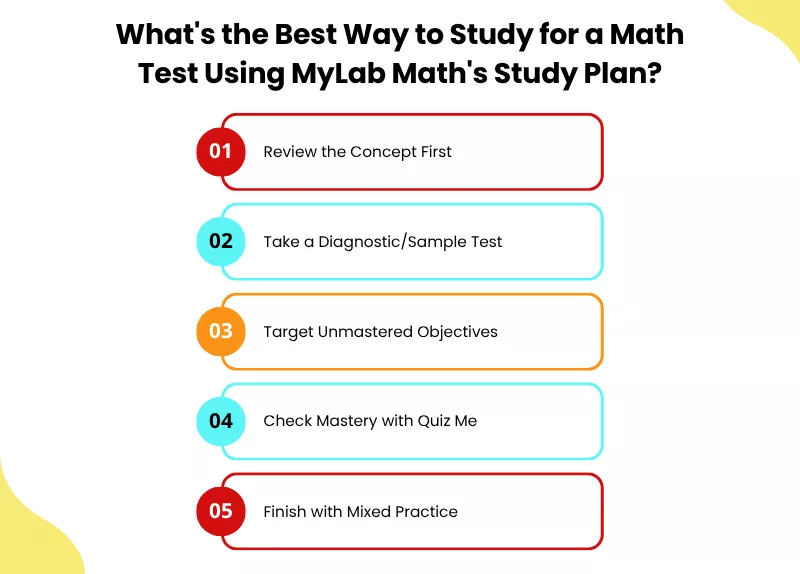
- Review the Concept First: Read the relevant eText section or watch the linked video before doing problems.
- Take a Diagnostic/Sample Test: Complete any assigned practice test or sample test first; this updates your Study Plan recommendations.
- Target Unmastered Objectives: Open the Study Plan and start with topics marked as not mastered or recommended next.
- Check Mastery with Quiz Me: Use Quiz Me for each learning objective once you can solve problems independently.
- Finish with Mixed Practice: Use All Chapters to revisit older topics and ensure earlier material has not faded.
Read Jason M.’s MyMathLab success story to learn how he improved his grade from C- to A+. Individual results vary.
Can I Get Partial Credit on MyMathLab Questions With Multiple Parts?
Not always. MyMathLab can give partial credit on questions with multiple parts, but only if your instructor has enabled that setting for the assignment.This is how MyMathLab partial credit works: when it is available, MyMathLab scores each part separately.So, you can earn partial credit when at least one answer is correct and at least one is incorrect. The score is calculated from the question’s point value and how many of the answer boxes you got right.
Conclusion
We hope this MyMathLab beginner’s guide will help you understand how the platform works, how you need to approach the problems, how the features work, and how you can improve your performance. When you are stuck, you can get help from your instructor, peers, Pearson support, or our math experts.
Frequently Asked Questions
What is MyMathLab?
Developed by Pearson Education, MyMathLab (now officially rebranded as MyLab Math) is an online interactive educational and assessment platform. This platform is designed to support students using Pearson mathematics textbooks, covering subjects from basic math and developmental algebra to calculus, statistics, and specialized fields.
How does MyMathLab work?
MyMathLab offers auto-graded exercises, quizzes, and tests that let students practice and get instant feedback on online homework and assessments. With interactive learning aids, like “Help me solve this,” “View an example,” interactive eTextbooks, and AI-guided practice, students can turn mistakes into teachable moments. It generally offers unlimited retries, so students can retake homework and practice problems with randomized, similar questions until they improve their grades. Beyond that, students get a study plan and a progress tracker to monitor their grades.
Can MyMathLab detect cheating?
Yes, MyMathLab can detect certain types of cheating and track student activity, though its capabilities depend heavily on whether the task is regular homework or a proctored exam. It may also use LockDown Browser on proctored tests when the instructor enables it.
How to check your grade on MyMathLab?
To check your grade, log in to your account and access your results through the course menu or your school’s LMS.
Can you go back to a question on MyMathLab?
If you are currently working on an active assignment or reviewing a finished one, you can go back to a question on MyMathLab. To review a finished assignment, go to Results or Gradebook, find the assignment, and click Review.
How many attempts do you get on MyMathLab?
You usually get 3 attempts; however, it depends on the instructor’s settings.
How do I register or join my course (course ID, access code)?
To register or join your MyMathLab course using a course ID or access code, the exact steps depend on the learning platform your instructor uses. When integrated with Canvas/Blackboard, your instructor will connect the course directly through your school’s LMS.
How much does MyMathLab cost and where can I get access?
MyMathLab typically costs between $50 and $165 for standalone digital access, depending on your course requirements and how long you need it. You can get it directly from Pearson, buy a physical, scratch-off “Student Access Card” or booklet containing a printed code directly at your university bookstore, or from authorized retailers. Make sure the access code is new and unused.
How does MyMathLab grade homework, and do wrong attempts lower my score?
MyMathLab gives you multiple tries to answer a homework question before marking it wrong. Also, wrong attempts on a single question generally do not lower your score as long as you get it right within your allowed attempts.

Want To See My Profile — Check Now
- MyMathLab Beginner’s Guide: How It Works, Scoring, and Homework Tips - October 10, 2026
- How to Avoid Plagiarism? Top 10 Rules for Students - August 18, 2026
- Can You Get Edmentum Answer Key? All Myths Busted - June 27, 2026


